
AI can save you time. But what happens when saving time also means doing less of the thinking yourself?
That question is becoming surprisingly important. AI can write a first draft, summarize a long document, suggest ideas, explain a difficult topic, plan a project and even help you make a decision. Used well, that is powerful. Used automatically, it can become a habit: ask, accept, copy, move on.
The problem is not that AI exists. The problem is when convenience becomes a substitute for understanding.
This guide calls that pattern the AI convenience trap. It is not a claim that AI is “making people stupid,” and it is not an argument for avoiding AI. It is a practical way to use AI while keeping your own judgment, curiosity and skills in the driver’s seat.
In one sentence: let AI remove unnecessary work, but do not automatically outsource the thinking that makes the work valuable.
Table of Contents
- What is the AI convenience trap?
- Why this matters now
- What the research actually says
- 10 signs you may be relying on AI too much
- Passive AI vs active AI
- The five-step PAUSE method
- What to delegate — and what to keep
- If you are learning something
- If you use AI at work
- A simple 7-day AI reset
- Prompts that make AI help you think
- The bottom line

What Is the AI Convenience Trap?
The AI convenience trap happens when a useful tool gradually becomes the default answer to tasks that would benefit from your own attention.
It can look harmless:
- You ask AI to summarize every article instead of reading the important parts yourself.
- You ask for ideas before you have formed any of your own.
- You accept an explanation because it sounds confident.
- You ask AI to make a decision before you have defined what matters to you.
- You copy a polished paragraph without being able to explain it in your own words.
- You use AI to avoid the uncomfortable first five minutes of thinking.
None of these actions is automatically bad. The trap appears when they become automatic.
A calculator is useful because you do not need to perform every multiplication in your head. But if you are learning mathematics, there are times when doing the calculation yourself is part of learning. AI creates a similar distinction, only across far more kinds of work.
Why This Matters Now
AI has moved from being an occasional novelty to being part of ordinary work and everyday life. People use it for writing, research, coding, planning, learning, brainstorming, customer communication and personal organization.
That creates a new skill: knowing when to use AI and when to keep the difficult part for yourself.
HICONY already covers the productive side of this question. Our guide on using AI to increase freelance output without burning out explains how AI can fit inside a deliberate workflow. Our AI image prompt checklist shows another example: AI does the generation, but the human still decides what the image should communicate and whether the result is actually good.
This article focuses on the other half of the equation: protecting the human thinking that should remain in the workflow.
What Does the Research Actually Say?
The research is interesting, but it is also more nuanced than many viral headlines suggest.
A study of knowledge workers
A 2025 CHI study from researchers at Carnegie Mellon University and Microsoft Research surveyed 319 knowledge workers and collected 936 first-hand examples of AI use at work. The researchers reported that higher confidence in AI was associated with less reported critical-thinking effort, while higher confidence in one’s own abilities was associated with more critical-thinking effort. They also found that AI-assisted work shifted critical thinking toward activities such as verifying information, integrating the response and managing the overall task.
That is an important distinction. AI did not simply remove thinking. In many cases it changed where the thinking happened. If the user stops verifying and integrating, however, the human part of the process can become much thinner.
Read the Microsoft Research study.
A small MIT preprint attracted a lot of attention
A 2025 MIT Media Lab preprint compared essay writing with an LLM, a search engine and no external tool. The study involved 54 participants in the first three sessions, with 18 taking part in a fourth session. The authors reported differences in EEG-based measures, writing characteristics and memory/ownership measures across the groups.
Those findings are interesting, but this is a small preprint, not a final verdict on what AI does to the human brain. It should be treated as evidence worth investigating rather than proof that ordinary AI use permanently weakens cognition.
Read the MIT Media Lab publication.
The practical lesson
You do not need to believe the most dramatic AI headlines to take the issue seriously.
A simple observation is enough:
If AI performs a mental task for you, you should know whether you are outsourcing busywork or outsourcing a skill you still need to possess.
That is the line this article is designed to help you see.
10 Signs You May Be Relying on AI Too Much
- You ask before thinking. You open AI immediately instead of first spending two or five minutes forming your own view.
- You cannot explain the answer afterward. The result looks good, but you do not really understand it.
- You rarely verify important claims. A confident tone feels like evidence.
- Your first drafts have disappeared. You no longer practice turning rough thoughts into structured ideas.
- You ask AI to make every decision. You want it to tell you what to buy, choose, say or do without first defining your priorities.
- You become uncomfortable with a blank page. Starting from nothing feels impossible unless AI produces something first.
- You use the same answer everywhere. AI-generated wording begins replacing your own voice.
- You accept suggestions that you would normally question. The convenience makes skepticism feel like extra work.
- You are learning less from the task. You finish faster but remember less.
- You cannot tell which parts were yours. Your ideas, the AI’s suggestions and the final answer become difficult to separate.
One sign alone does not mean you have a problem. The useful question is whether the pattern is becoming automatic.
Passive AI vs Active AI
The difference is simple:
| Passive AI use | Active AI use |
|---|---|
| “Give me the answer.” | “Help me examine the problem.” |
| Copy and paste. | Read, question and rewrite. |
| Accept the first response. | Ask what could be wrong or missing. |
| AI chooses the criteria. | You define what matters first. |
| AI becomes the final authority. | AI becomes an assistant you supervise. |
| Speed is the only goal. | Speed and understanding both matter. |
Active AI use does not mean making everything harder. It means adding a small amount of human control where that control matters.
The Five-Step PAUSE Method
Here is a simple five-step system you can use with almost any AI tool. The name is easy to remember: PAUSE.
1. P — Pause before prompting
Before opening AI, give yourself a short head start. Spend two or five minutes thinking about the problem.
Write a few notes, state what you already know, or make a rough plan. It does not need to be good. The point is to make sure your first thought is still yours.
2. A — Ask for help, not automatic answers
Now use AI where it can genuinely help.
Instead of asking, “Do this whole thing for me,” try questions such as:
- “What am I missing?”
- “Give me three ways to approach this.”
- “What are the pros and cons?”
- “Explain this simply so I can understand it.”
AI becomes more useful when you use it to expand your thinking rather than immediately replace it.
3. U — Understand and verify
Do not accept an answer just because it sounds confident.
For important claims, check reliable sources. Look for evidence. Compare information when necessary. Most importantly, make sure you actually understand what the answer is saying.
You do not need to fact-check every harmless sentence. Focus your checking on facts that could change a decision, cost money, affect someone’s safety, or be repeated as truth.
4. S — Shape the useful parts in your own words
Take the useful information and make it yours.
Rewrite it. Explain it without looking at the AI answer. Turn it into your own notes. Apply it to your own situation. If you cannot explain the idea simply, you probably need to understand it better before using it.
5. E — Evaluate and decide
Finally, compare the result with your goals, values, circumstances and evidence.
- Does this actually solve my problem?
- What could go wrong?
- What important information might be missing?
- Does this fit what matters to me?
- Am I comfortable taking responsibility for the final choice?
AI can help you explore options. You keep responsibility for the decision.
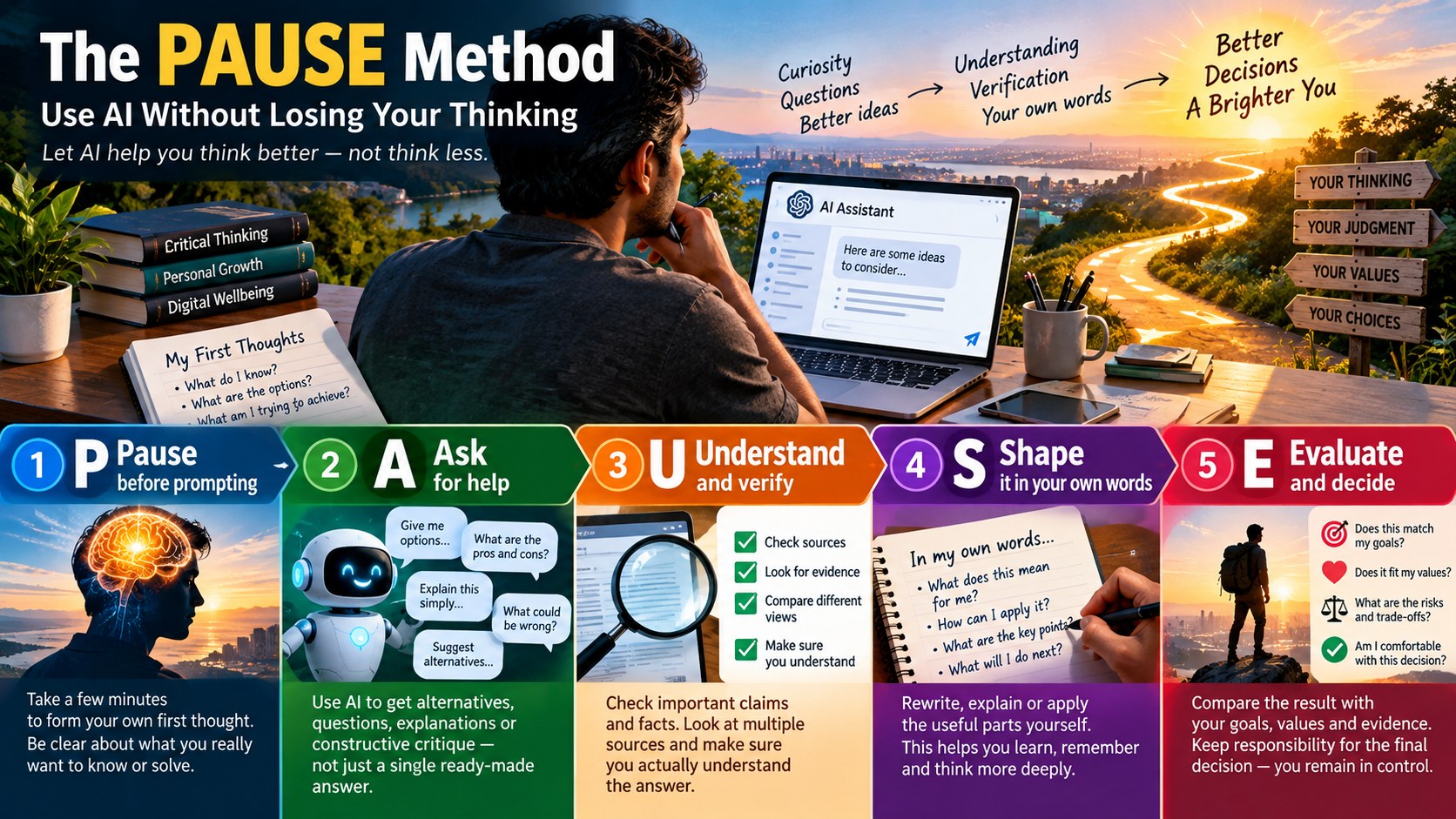
Remember PAUSE: Pause before prompting. Ask for help. Understand and verify. Shape the useful parts in your own words. Evaluate and decide.
What Should You Delegate to AI — and What Should You Keep?
A useful rule is to divide tasks into three groups.
| Task type | Good AI role | Human role |
|---|---|---|
| Repetitive work | Draft, format, summarize, organize | Spot errors and approve |
| Creative exploration | Generate alternatives | Select, combine and improve |
| Learning | Explain, quiz, give examples | Think, practice and recall |
| Research | Find angles and questions | Verify sources and evidence |
| Important decisions | Surface trade-offs | Set values, accept responsibility |
The goal is not “never delegate.” The goal is delegate the parts that do not need to remain in your head, while practicing the parts you want to stay good at.
If You Are Learning Something
This is where the convenience trap can become especially subtle.
If you are learning a language, programming, mathematics, writing or any other skill, getting the answer quickly can feel like progress. But sometimes the struggle is part of the learning.
Try a three-stage learning loop:
- Attempt first. Even if you expect to fail.
- Ask AI second. Ask for a hint, explanation or critique rather than immediately requesting the finished answer.
- Try again. Solve the problem without looking at the previous answer.
That is much closer to having a tutor than having a machine do your homework.
If You Use AI at Work
At work, the temptation is different. You may be rewarded for speed, so it is easy to measure AI only by how much time it saves.
But quality matters too.
HICONY’s AI workflow guide for freelancers recommends giving AI a defined role inside a repeatable process. Add one more step: human quality control.
A simple work loop is:
Brief → Think → AI assist → Verify → Human edit → Quality check → Deliver
That is often better than:
Prompt → Copy → Send.
If you are building a business or content workflow, this distinction becomes even more important. AI can help you produce more, but producing more low-quality material faster is not the same as creating more value.
A Simple 7-Day AI Reset
You do not need to stop using AI. Try this instead.
| Day | Experiment |
|---|---|
| 1 | Before your first AI prompt, spend five minutes thinking on your own. |
| 2 | Ask AI for questions and alternatives instead of a finished answer. |
| 3 | Verify three important AI claims using original or authoritative sources. |
| 4 | Rewrite one AI-assisted answer completely in your own words. |
| 5 | Do one task without AI that you normally delegate to it. |
| 6 | Use AI to challenge your thinking: ask for the strongest argument against your view. |
| 7 | Review what actually improved. Keep the useful habits and drop the unnecessary ones. |
This is not an anti-AI challenge. It is an AI-with-awareness challenge.
Prompts That Make AI Help You Think
Instead of always asking for the finished product, try prompts like these:
- “Here is my first attempt. What am I missing?”
- “Give me three competing explanations.”
- “What assumptions am I making?”
- “What evidence would change this conclusion?”
- “Argue the strongest case against my current position.”
- “Which parts of your answer should I verify independently?”
- “Do not solve this yet. Ask me questions that help me solve it myself.”
- “Turn this into a short quiz so I can test whether I actually understand it.”
These prompts do something simple: they make you stop, question your assumptions and understand the answer instead of simply accepting it.
AI, Screen Time and Your Digital Life
There is another reason this topic fits HICONY’s existing content.
AI can reduce some digital friction while increasing another kind of screen dependence. You may use fewer search tabs but spend more time in AI conversations. You may get answers faster but remain online longer.
That is why this article pairs naturally with HICONY’s guide on what a digital detox actually means. The goal is not simply less technology. It is more intentional technology use.
You can also connect this with HICONY’s guide on building emotional intelligence: the same pause between impulse and response can be useful with AI. Notice the urge to ask. Pause. Decide what you actually need.
AI and Better Decisions
There is a useful connection to HICONY’s recent Decision Reset guide.
AI is excellent at generating possibilities. That can be helpful when your mind is stuck.
But more possibilities can also create more noise.
So use AI after you have defined the decision. Give it the criteria that matter. Ask it to identify trade-offs. Then make the final judgment yourself.
Do not ask AI to replace the decision. Ask it to improve the decision process.

Five Situations Where You Should Slow Down
- The information is important. Verify it.
- The decision is difficult to reverse. Take more time.
- You are learning a skill. Try first.
- The AI answer confirms exactly what you wanted to hear. Look for a counterargument.
- You cannot explain the output. Stop and understand it before using it.
The Bottom Line
The future is unlikely to be a simple choice between “humans” and “AI.” Most people will use both.
The more useful question is:
When AI becomes extremely convenient, which parts of thinking do I still want to practice myself?
Keep asking that question.
Use AI to remove repetitive work. Use it to explore possibilities. Use it to explain difficult ideas. Use it to challenge your assumptions. Use it to help you organize information.
But when the task is helping you develop judgment, knowledge, creativity, communication or a skill you care about, do not always take the shortcut.
Pause. Ask. Understand. Shape it in your own words. Evaluate and decide.
That is how AI can become a tool for your thinking rather than a replacement for it.
Quick Takeaway
The AI convenience trap is not about using AI too much by a magic number of hours. It is about using AI automatically for tasks that benefit from your own thinking. A better approach is to pause before prompting, ask AI for useful help, understand and verify important claims, shape the useful parts in your own words, and keep responsibility for the final decision.
Sources and Further Reading
- Microsoft Research / CHI 2025: The Impact of Generative AI on Critical Thinking
- MIT Media Lab: Your Brain on ChatGPT
- British Journal of Educational Technology: Critical thinking and reliance on generative AI
- Google Search Central: Creating Helpful, Reliable, People-First Content
- Google Search Central: Guide to Optimizing for Generative AI Features
Important Note
This article is an educational guide about technology use, learning and personal productivity. It is not medical or mental-health advice. Research on AI and cognition is still developing, and individual effects can vary.